
Paid to Click & Browse

Paid to Click & Browse

By: Chris B.
Published on August 7, 2026
Lately, there have been many earning opportunities on CreationsRewards where members can earn points for visiting and exploring various websites.
Paid-to-click opportunities are a simple way to earn rewards by browsing online content, checking out websites, and following the listed instructions for each offer. If you’re looking for another way to build your point balance beyond surveys, videos, cashback shopping, and mobile app activities, the Paid to Click section is worth checking regularly.
Explore Paid-to-Click Opportunities
CreationsRewards offers a variety of website visit opportunities directly in the Paid to Click section. These opportunities may vary depending on whether you are accessing CreationsRewards from a desktop or laptop computer, or from a smartphone or tablet.
For the best experience, we recommend checking the Paid to Click section from both:
- Your desktop or laptop computer
- Your smartphone or tablet
Just be sure not to use both at the same time. To help ensure proper tracking, only keep one CreationsRewards session open at a time.
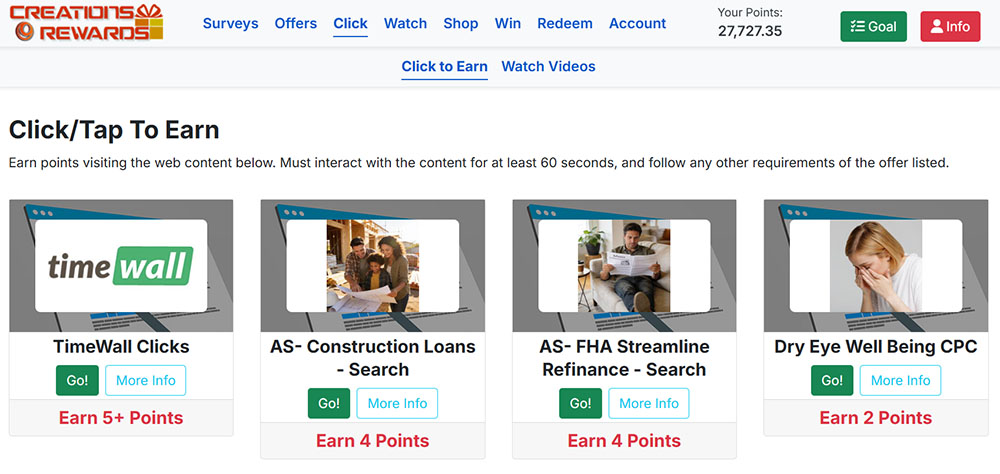
Don't Forget TimeWall Clicks
We've also covered TimeWall paid-to-click opportunities in a separate article. TimeWall frequently refreshes its available clicks, so members should consider visiting TimeWall’s click section at least once per day.
Checking both CreationsRewards paid clicks and TimeWall clicks can help you discover more website visit opportunities and earn more points over time.
Always Read the "More Info" Section
To make sure you properly earn points for clicking or tapping on websites, always expand the More Info section before starting.
Click or tap More Info to view any special requirements for that opportunity. Some website visits may simply require you to visit and actively browse a website for a short period of time.
Other visits may include additional steps that must be completed before points can be awarded.
Some Clicks Have Special Requirements
Not all paid-to-click opportunities work the same way. Some website visits may require additional actions to properly credit back to your CreationsRewards account.
For example, a paid click may require you to:
- Click through to the website
- Complete a search
- Visit one of the search results
- Stay active on the site for a required amount of time
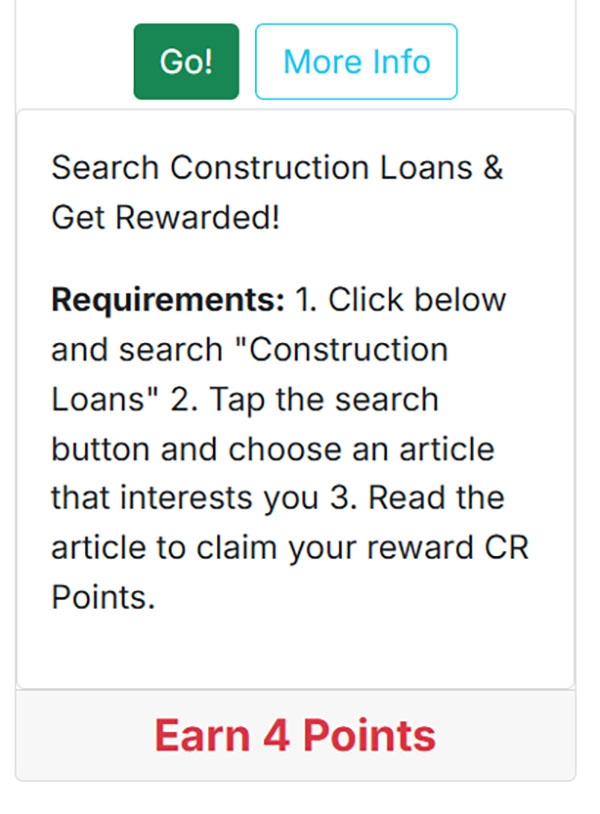
If the listed instructions are not followed correctly, points may not be awarded. That's why it's important to take a moment to review each offer before getting started.
Tips for Successful Paid-to-Click Earning
To improve your chances of earning points from paid-to-click opportunities:
- Read the full offer details before clicking
- Expand the More Info section when available
- Follow all listed instructions carefully
- Allow websites to fully load
- Stay active on the required page when instructed
- Avoid running multiple CreationsRewards sessions at the same time
- Check back regularly for new opportunities
We want our members to be successful reward-earners, and following the instructions for each paid click is the best way to help ensure your activity is tracked properly.
Check Back Often
The Paid to Click section is updated frequently, so it's a good idea to check this area at least once per day.
If you have access to both a desktop or laptop computer and a smartphone or tablet, be sure to check from both types of devices. Different opportunities may be available depending on how you access CreationsRewards.
Ready to Get Paid to Click?
Join CreationsRewards free and earn points through paid surveys, watching videos, visiting websites, cashback shopping, and more.
Already a member? Login.
Start Browsing and Earning
Paid-to-click opportunities are a simple way to earn extra points while exploring websites and online content that may be of interest to you.
Whether you're looking for a quick way to earn a few extra points or want to maximize your daily earning routine, the Paid to Click section is another valuable area to include in your CreationsRewards activity.
Check back often, follow the instructions carefully, and keep building your point balance one click at a time.
More Articles
Earn Points with BitLabs Surveys
Sep 02, 2026

Ways to Earn Rewards Without Taking Surveys
Aug 29, 2026
Earn More with the RevU Offerwall
Aug 26, 2026

Are Paid Survey Sites Legit?
Aug 21, 2026

Easy Ways to Earn Extra Money from Home
Aug 18, 2026