
Earn Rewards Watching Video Content

Earn Rewards Watching Video Content

By: Chris B.
Published on May 26, 2026
One of the many ways to earn points and rewards on CreationsRewards is to watch videos. You're probably already watching video content elsewhere on the Internet, why not get paid to do so?
CreationsRewards offers the ability to be rewarded for watching rewarded video through PixelPointTV. This is a video provider that rewards people like you for watching engaging visual and video content. But how does it work?
There's a one-time setup process that you have to complete to begin earning points and rewards on CreationsRewards for watching videos on PixelPointTV. The Watch & Explore section of CreationsRewards has all of the categories of videos listed that you can actively begin watching to accumulate points.
1. Visit a Video Category
The first step is to select a video category from the list in the Watch & Explore section on CreationsRewards. There are many categories to choose from. There are categories for recipes, music videos, how-to videos, tech videos, and so much more. Pick one from the list to launch it.

2. Register or Login to PixelPointTV
This is the most important step of the process. You must login, or register, for PixelPointTV. To do this, click or tap on the "Rewards" button underneath any video. You'll see a prompt asking you to register or login. Select register if you've never used PixelPointTV before. Select login if you currently have an account. This account is separate from your CreationsRewards account.

3. Begin Watching Rewarded Videos
Start watching videos after you have registered or logged into your PixelPointTV account. As you watch videos, you'll accumulate points on PixelPointTV. These are not CreationsRewards points, but points specific to PixelPointTV. For every 9 points on PixelPointTV that you earn, this will convert to 1 CreationsRewards point. It does not take that long to accumulate 9 points on PixelPointTV.
4. Transfer Your Earnings to CreationsRewards
After reaching at least 9 PixelPointTV points, you can redeem (transfer) them to your CreationsRewards account. Tap or click on the blue "Redeem" button which is located underneath any video.
If you are not seeing the blue Redeem button, make sure you are logged in to your PixelPointTV account. This button only appears after you are successfully logged in.

Select CreationsRewards from the partner list that appears. Then, click/tap on "Redeem Balance". You'll receive a confirmation message showing your points were transferred. It takes a few minutes for your transfer to appear in your CreationsRewards account.
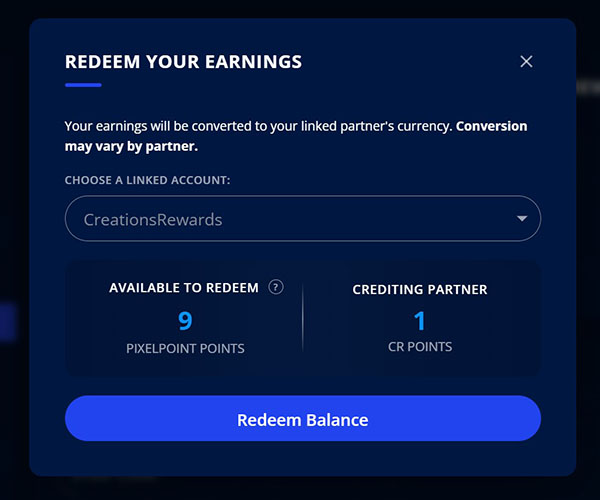

Then, get back to watching more videos! Remember, 9 PixelPointTV points equal 1 CreationsRewards point. We recommend that you transfer your points when you reach a number that's divisible by 9, but you don't have to do this.
For example, if you earned 81 PixelPointTV points, you will have 9 CreationsRewards points credited to your account.
This information should make it much easier for members to understand how to properly be rewarded for watching engaging videos online. You're most likely already watching videos on YouTube and other video sources, why not start getting rewarded for it?
If you have any questions or need help, CreationsRewards is happy to help you. We have a stellar Customer Care team ready to answer any questions that you may have.
More Articles

What Are Paid Surveys?
May 10, 2026

Get Paid To Click or Tap
May 10, 2026

Welcome to CreationsRewards Paid Surveys!
May 10, 2026

What are Daily Surveys?
May 10, 2026

Survey Portals - What You Need To Know
May 10, 2026